Tuesday, 18 September 2012

Quick Screen Recorder with key

Quick Screen Recorder is a video screen capture, screen recording tool used for recording screen activity into standard AVI video files. If you move the cursor, launch a new program, type some text, click a few buttons, or select some menus -- anything that you see on your screen -- Quick Screen Recorder will be able to record all these and even the sound.

You can use Quick Screen Recorder to develop videos to demonstrate features of a new software, for creating movies used in user training, for tracking the progress of a program that executes for a long time, or for recording the sequence of steps that cause the occurrence of bugs in faulty software. You can also speak into the microphone while recording is in progress to include audio with the recorded video.

So here is your download 
just click on skip add

Access blocked websites

Hey guys i think that in some countries some websites are blocked due to some reason so here it is to open all the blocked websites
just click on skip the ad and download the txt file and be happy  ♥♥♥♥♥♥
:):):):):):):):)
sooo here is the file

DOWNLOAD ME 

Monday, 17 September 2012

accelerate ur gaming experience

heyyy guyss do u you have low graphics config and you are not able to play cool games remove this i ashwini gupta is giving you the best softwares to play the big games with low config use these softwares and play it harddd
so here are the linkkk
JUST CLICK ON SKIP ADD

SECRET
AND
SECRET
Use both to get the best result

Saturday, 1 September 2012

Set Processes Priority

Follow this tip to increase the priority of active processes, this will result in prioritisation of processes using the CPU.

CTRL-SHIFT-ESC


1.Go to the second tab called Processes, right click on one of the active processes, you will see the Set Priority option
2.For example, your Run your CDwriter program , set the priority higher, and guess what, no crashed CD’s
 

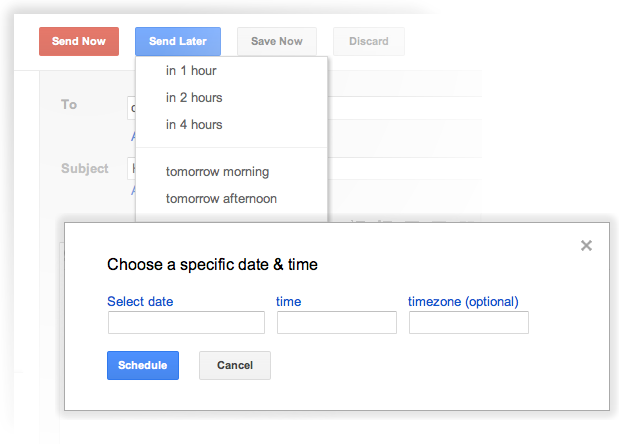
HOW TO SCHEDULE EMAILS IN GMAIL TO BE SENT LATER

If you want to send emails later or we say schedule them in Gmail than Right Inbox can do this work easily. Well Right Inbox is a just an extension which when installed and permitted can be embed into your Gmail account and can be used to schedule your emails right away. This can be helpful if you wanna send some occasion greetings or any other stuff or a particular day but you might not be available for writing that email down than you can schedule it now and let Right Inbox deliver it for you when ever you want it to be.

Right-Inbox-Gmail
If you want to install Right Inbox and schedule your emails, than you can visit there there installation page to get extension and follow all the steps to authenticate it with your Google account. So now just send all the greetings right away without actually being there sitting and typing for them :)

Incognito Window In Google Chrome For Safe Browsing


Have you ever tried Incognito window in Google Chrome? Pages you view in this window won't appear in your browser history or search history, and they won't leave other traces, like cookies, on your computer after you close the incognito window. Any files you download or bookmarks you create will be preserved. In my previous post, I explained about How to protect in cafe while surfing internet? which is one more way for safe browsing.

For enabling incognito window in google chrome press Ctrl+Shift+N in google chrome window.